 DevCleaner
You spend days and weeks tuning every pixel of your landing page. You ship the app, get your first users, and feel good that the tool actually helps someone. Then one morning you open your messages and find a warning from a user.
That’s exactly what happened to me. A user sent a screenshot. At first glance it was my own DevCleaner site. On the second look, the domain wasn’t mine, and the app name was mangled to CleanDev. Hackers had copied the page pixel by pixel to distribute an info-stealer.
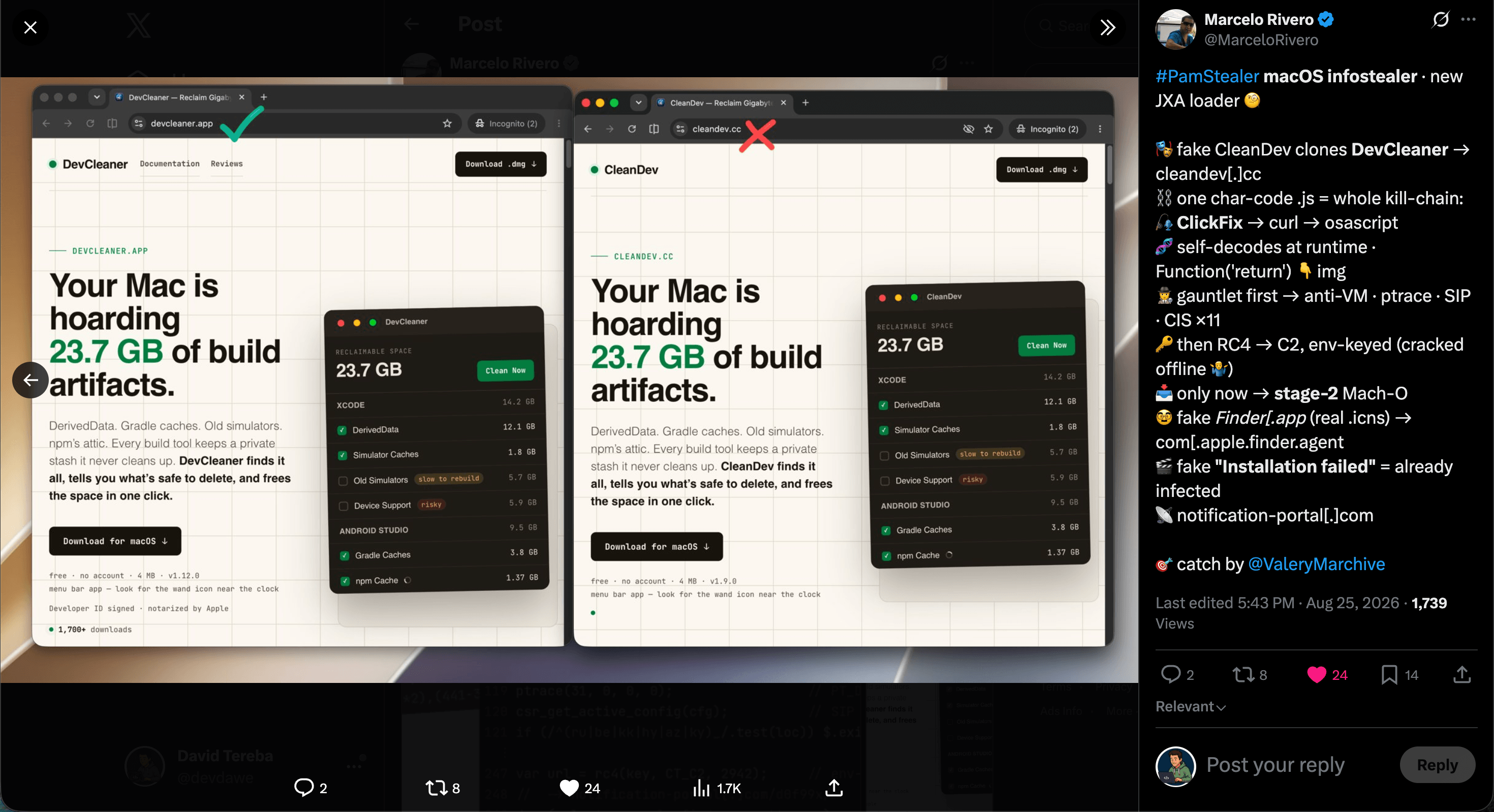
Bottom line up front: DevCleaner itself was not compromised. This is a fake clone on a third-party domain. Download only from https://devcleaner.app.
Anatomy of the scam: PamStealer in action
As security researchers flagged publicly, the attackers registered a fake domain and abused the DevCleaner design to distribute malware known as PamStealer. The flow is uncomfortably simple:
- Someone lands on the lookalike site and downloads the fake “installer.”
- A quiet JXA loader runs.
- A fake error dialog pops up, “Installation failed”, so the victim assumes nothing installed and moves on.
- By then the Mac is already infected, and the malware is talking to its C2 server in the background.
The “failed install” is the trick. It feels like a broken download. It’s cover for a successful infection.
DevCleaner, and your real install, are safe
I want to be crystal clear: my code, my servers, and the DevCleaner app itself were not compromised. This is purely phishing and design theft on a domain I don’t control.
If you downloaded DevCleaner from the official site, you have nothing to worry about from this campaign.
How to spot the real app
This is an ugly risk indie developers face once a tool gets popular. Attackers know developers are actively looking for ways to free disk space, and they try to ride that intent.
What to check every time:
- The only official domain. DevCleaner downloads exclusively from https://devcleaner.app. Bookmark it. Don’t trust search ads or lookalike URLs.
- Signature and notarization. The real DevCleaner is Developer ID signed and notarized by Apple (team David Tereba). On first launch, Gatekeeper should allow it. Unsigned malware often shows “can’t be opened because it is from an unidentified developer,” or never passes notarization.
- Size and price. Real DevCleaner is a small utility, about 10 MB, completely free, with no account required. A site that pushes “CleanDev,” asks for signup, or ships a bloated mystery binary is not us.
- Optional SHA-256. Current release checksums are published at
/downloads/SHA256SUMSand on the homepage under Verify your download. Runshasum -a 256on the file you downloaded (for 1.16.1:shasum -a 256 ~/Downloads/DevCleaner-1.16.1.dmg) and compare the result with the line for that version.
A twisted compliment. On one hand, it’s a backwards form of flattery: the design was clearly good and trustworthy enough to pass a cybercriminal “approval process.” On the other hand, it’s a nightmare. You don’t want your work used to attack the same developer community you built it for.
FAQ
- Was DevCleaner hacked?
- No. Nothing on our side was breached. Attackers cloned the public website onto a domain they own and used that clone to distribute malware.
- I searched “DevCleaner” and found another site. Is it safe?
- Only trust https://devcleaner.app. Clones often swap one letter, reverse the name (CleanDev), or sit behind paid ads. Check the address bar before you download anything.
- What should I do if I already downloaded from a fake site?
- Treat the machine as potentially compromised. Don’t run the fake installer again. Follow current macOS malware-removal guidance from Apple or a trusted security researcher, rotate credentials from that Mac if you entered any, and install the real app only from the official URL above once you’re clean.
Get the real DevCleaner: from the real site
Free, tiny, and signed. If the URL isn’t devcleaner.app, close the tab.
Download DevCleaner: free ↓